Screenshots worth sending.
Capture a window or a region, mark it up, and get it into the clipboard — without leaving your keyboard. A small native app for Mac and Windows.
Apple silicon — M1 and later
Your computer warns you the first time. The next page shows what to click.
Free for 30 days, no account and no card. macOS 12 or later, or Windows 10 and 11.
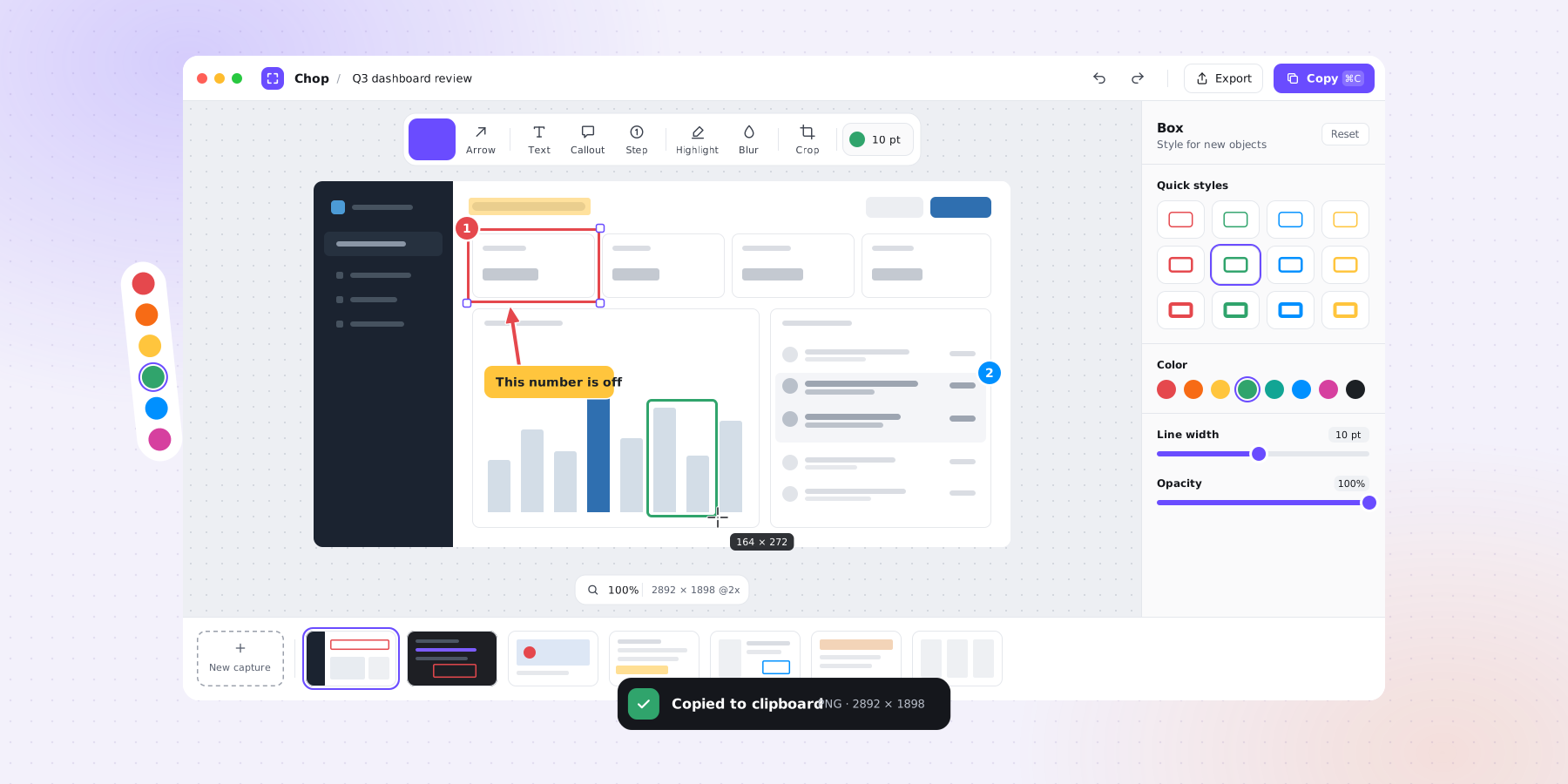
Built for the screenshot you send to someone else
The gap between pressing a shortcut and having something worth sending is where Chop lives. Everything else is somebody else's app.
Window or region, one click
Hover a window and click to take exactly it, or drag out any region. Escape backs out.
Mark it up on the spot
Boxes, arrows, text, highlighter, blur and crop — each a single keystroke away, no mode-hunting.
Straight to the clipboard
Press ⌘C and the annotated image is ready to paste into Slack, a ticket, or an email.
Blur what should not ship
Cover a token, an address or a customer name before the screenshot leaves your machine.
Nothing to file
Captures save themselves to your Pictures folder. Past ones sit in the filmstrip and reopen fully editable — annotations and all.
Out of your way
Lives in the menu bar on a Mac and the system tray on Windows. ⇧⌘2 — Ctrl+Shift+2 on Windows — works in any app, and rebinds to whatever your hands already know.
Shortcut to sent, without a detour
Press ⇧⌘2
Ctrl+Shift+2 on Windows. The screen freezes — click a window to take exactly it, or drag out a region.
Point at what matters
Box it, arrow to it, highlight it, blur what should not be seen. Undo is where you expect it.
Press ⌘C
It is on the clipboard, and already saved to your captures folder in case you want it again.
Launch offer — 10 seats
The first 10 people get Chop for nothing. Forever.
Not a trial that runs out, and not a smaller version. One code at checkout takes the Personal licence from $19 to $0 — the same app everyone else pays for, yours to keep.
- Every feature unlocked — the identical build, not a stripped one.
- Every future version included. Nothing to pay now, nothing to renew later.
- 10 seats, first come first served. The code stops working after that.
The link applies FIRST10 for you; if you land on checkout another way, paste it into the discount field. Miss out and nothing is lost — Chop is still free to use for 30 days, with no account and no card.
Buy it once
No subscription. Try everything for 30 days first — no account, no card, no nagging until the trial is actually over.
The first 10 users pay nothing at all. Code FIRST10 takes Personal to $0 at checkout, licence and updates included — see the offer.
Most popular
Personal
For your own machine.
$19one-off
- Every feature, no limits
- One computer, Mac or Windows
- Every future version, free
- Yours to keep — it never stops working
Business
For work machines and teams.
$79one-off, per seat
- Everything in Personal
- Every machine that seat is used on
- Licensed for commercial use
- Invoice with your company details
- Priority support by email
One payment, and that is the end of it. Every future version is yours at no extra cost, and there is no renewal, no upgrade fee and no subscription waiting behind it.
Payments are handled by Polar, who act as the merchant of record — VAT and sales tax are calculated and included at checkout, and your invoice comes from them.
Before you buy
Is the FIRST10 code really free?
Yes — it is a 100% discount, not a trial extension. Enter FIRST10 at checkout and the Personal licence costs $0, then the key arrives by email exactly as it would for a paying customer: perpetual, every future version included, no card charged now or later. There are 10 of them and the code stops working once they are gone.
How does the 30-day trial work?
Download it and everything is unlocked for 30 days — no account, no card, no reminders until the trial is genuinely over. After that Chop asks for a licence key before it will take a new capture. Captures you already made stay where they are, and you can still open and edit them.
How do I get my licence key?
It is emailed to the address you buy with. Paste it into Chop under Settings → License and press Activate — it takes effect straight away, with no restart. Keep the email: that key is what moves your licence to another Mac.
Can I use one licence on more than one computer?
A Personal licence covers one computer at a time — move it freely between your own machines, but not two at once. Business covers every machine that seat is used on. Chop does not phone home to count them, so this runs on trust rather than enforcement; please buy Business for machines your employer owns.
Do I have to pay again for updates?
No — not after a year, not ever. Every future version is included in what you already paid, and so is support. There is no renewal, no upgrade fee and no subscription behind any of it.
Does it need an internet connection?
No. Your key is checked on your own Mac using cryptography, not a licence server, so activation works on a plane. The only request Chop ever makes is checking whether a newer version exists.
Does my licence expire?
No. It is a one-off purchase with nothing to renew — the app keeps working, and keeps updating, for as long as you want to use it.
What happens to my screenshots?
They stay on your computer, in ~/Pictures/Chop on a Mac and your Pictures\Chop folder on Windows. There is no account, no cloud sync and no analytics — Chop has nowhere to send them even if it wanted to.
I am getting a new computer. How do I move my licence?
Open Settings → License on the old machine and choose Remove, then paste the same key into the new one. Nothing to deactivate on our side, and a licence moves between a Mac and a PC just as happily.
Why does my computer say Chop cannot be verified?
Because Chop is not signed with a paid Apple or Microsoft certificate yet. macOS blocks the very first launch and asks you to allow it under System Settings → Privacy & Security; Windows shows a SmartScreen panel where Run anyway is hidden behind More info. Both are objections to the missing certificate rather than to the file you downloaded, both happen exactly once, and signing is on its way.
What do I need to run it?
macOS 12 or later, or Windows 10 and 11. Mac builds are published for both Apple silicon and Intel. On a Mac, Chop needs Screen Recording permission, which macOS asks for the first time you capture; Windows needs no such grant.
Something not covered? Email support@chop.asia.
Your computer will warn you once
Chop is not signed with a paid certificate yet, so macOS and Windows both stop the first launch of an app they do not recognise. Here is exactly what you will see, and what to click.
macOSGatekeeper blocks the first launch. Once past it, never again.
What you will see“Apple could not verify “Chop” is free of malware that may harm your Mac or compromise your privacy.”
- Install it as usualOpen the .dmg you downloaded and drag Chop into your Applications folder, then eject the disk image. Nothing unusual happens yet.
- Open Chop once, and let macOS refuseDouble-click Chop in Applications. macOS shows the warning above, offering only Done and Move to Trash. Click Done. This step is not optional — the next one only becomes available after a blocked launch.
Done leaves Chop exactly where it is. Move to Trash deletes it — that is the one button on this dialog you do not want. - Allow it in System SettingsOpen System Settings → Privacy & Security and scroll to the bottom of the Security section. There is a line reading “Chop was blocked to protect your Mac”. Click Open Anyway.
Right at the bottom of the Security section, under the settings that are always there. It only appears once a launch has been blocked. - Confirm, and you are doneAuthenticate with Touch ID or your password, then click Open Anyway once more. Chop opens. Every launch after this one is an ordinary double-click — you never see any of this again.
- Allow Screen RecordingThe first capture asks for Screen Recording permission, which macOS requires of anything that can see your screen. Switch Chop on in System Settings → Privacy & Security → Screen Recording, then quit and reopen Chop so it picks the grant up.
- The Open Anyway button only appears for about an hour after a blocked launch. If it is not there, open Chop again first and go straight back to Settings.
- On macOS 14 and earlier there is a shortcut: Control-click Chop in Applications, choose Open, then Open again in the dialog. macOS 15 removed it, which is why the long way round is written out above.
- If macOS says Chop is damaged and should be moved to the Trash, click Cancel — not Move to Trash — then use Open Anyway in Privacy & Security as above. That dialog is Gatekeeper, not a corrupt download.
WindowsSmartScreen warns about the installer. Two extra clicks.
What you will see“Windows protected your PC — Microsoft Defender SmartScreen prevented an unrecognised app from starting.”
- Keep the downloadEdge and Chrome sometimes flag the file as it lands. If yours does, open the browser’s downloads list and choose Keep, then Keep anyway if it asks a second time.
- Run the installerDouble-click the .exe you downloaded. SmartScreen shows the panel above, offering nothing but a Don’t run button.
- Click More infoIt is the small link under the message, easy to miss. Clicking it names the app and its publisher — which will say Unknown publisher.
More info is a link rather than a button, set in small text under the message. Nothing else on the dialog will let you continue. - Click Run anywayThe button appears once More info is expanded. The installer runs normally from there, and Ctrl+Shift+2 works as soon as Chop is open. Windows asks for no capture permission.
Unknown publisher is expected — it is what SmartScreen calls anything without a paid certificate, and it is why Run anyway is hidden in the first place.
- Unknown publisher is what SmartScreen calls any installer without a paid code-signing certificate. It is a statement about the certificate, not about the file.
- If there is no Run anyway button at all, a policy on your machine is blocking unsigned installers outright. On a work computer that is your IT administrator’s call, not something to work around.
Both warnings are about a certificate we have not bought yet, not about the file you downloaded. Every build is published from the releases page with checksums, so you can confirm you have the same file we published. Signing and notarisation are coming, and these steps disappear the day they land.
Try it on today's screenshots
30 days, everything unlocked, no account and no card.
And if you are one of the first 10 to use FIRST10, you never pay for it at all.
Apple silicon — M1 and later
Your computer warns you the first time. The next page shows what to click.